
How to Get More Sales from Google Shopping's Free Listings (No Ad Budget Required)
Category
Content
Posted on
Updated

Author
Daria Nikolaeva
SEO & AI Search
Table of Contents
If you run an online store, you've probably noticed that showing up on google is getting harder and more expensive. Search results are now packed with paid ads, AI-generated answers, and Reddit threads — leaving less room for everyone else. The good news? Google Shopping's free listings can still put your products in front of buyers. And with the right setup, you don't need to spend a cent on ads to make it work.
Why Free Google Shopping Listings Matter More Than Ever
Let's be honest — paid search has gotten expensive. As more businesses compete for the same keywords, the cost per click keeps climbing. And with Google now filling results pages with AI summaries, ads, and community content, it's harder for small businesses to stand out organically.
That's exactly why google Shopping's free product listings are worth your attention right now. They let you show your products directly in search results — complete with photos, prices, and your store name — without paying for every click. Think of it as a level playing field where good product information beats a big ad budget.
The key is knowing how to set things up correctly inside Google Merchant Center. That's what the rest of this guide covers.
70 | 150 | $0 |
|---|---|---|
Characters visible in product titles before they get cut off | Max characters Google allows for product titles | Cost per click with free Shopping listings |
Start With Your Product Feed — It's the Foundation
Your product feed is essentially a file that tells Google everything about your products — what they are, what they look like, how much they cost, and whether they're in stock. If this data is messy or incomplete, everything else you do won't matter much.
Think of it like a first impression. When someone spots your product in Google Shopping, three things will make them click (or not): your photo, your price, and your title. Get those right, and you're already ahead of most competitors.
What makes a strong product feed?
High-quality images: Clear, well-lit photos on a white background tend to perform best. Blurry or cluttered images kill click-through rates.
Competitive pricing: If your price is way above what Google's showing for similar items, you'll get skipped — more on this in the pricing section.
Landing page consistency: The price, product name, and availability on your website must exactly match what's in your feed. Mismatches can get your listings paused.
Accurate, complete attributes: Every field matters. Google uses this data to decide when and where to show your product.
Check your Merchant Center account for feed errors regularly. Even small issues — like a mismatched price or a missing attribute — can quietly stop your products from showing up.
Write Product Titles That Actually Get Clicked
Your product title is one of the most powerful tools you have in Google Shopping — and most small businesses get it wrong.
Google gives you up to 150 characters for a product title. But here's the catch: only about the first 70 characters actually show up in search results. Everything after that gets cut off. So if your most important keyword is buried at the end of your title, shoppers will never see it.
The formula is simple: lead with your main keyword, then stack the attributes.
Product title comparison
Running Shoes by Nike — Comfortable, Lightweight, Available in Blue and white, Size 8-10
Nike Men's Running Shoes — Lightweight, Waterproof, Size 8–10, Blue/White
In the good example, the most searchable terms ("Men's Trail Running Shoes") come first, and then supporting attributes fill in the rest. Google — and shoppers — can immediately see what the product is.
What to include after your main keyword:
Size or dimensions
Color or material
Brand name (if not already leading)
Model number (especially important for electronics)
Key features that set it apart
Search for your product on Google Shopping yourself and look at what competitors are naming their listings. That'll give you real data on what's working in your niche.
Fill in Every Data Field — Seriously, Everyone
This is the part most small businesses skip because it feels tedious. But incomplete product data is one of the fastest ways to get lower visibility — or even get your Merchant Center account flagged.
Google uses your product data to understand what you're selling and match it to the right searches. The more complete and accurate your data, the better your chances of appearing when someone's actively shopping for what you offer.
The data fields you can't skip:
Unique Product IDs (SKUs): Every product needs a clear, consistent identifier in your feed.
GTINs (Global Trade Item Numbers): If your product has a barcode — a UPC, EAN, or ISBN — include it. Google uses this to verify your product and improve matching accuracy.
Real-time pricing and availability: If something is out of stock on your site but still showing as available in your feed, you'll frustrate customers and risk Merchant Center issues.
Detailed product type: Use your own product type field to be as specific as possible. This helps Google understand your catalog structure even beyond its own category system.
The bottom line
Incomplete data doesn't just hurt your rankings — it can result in reduced visibility across your entire account, or worse, account suspension. Treat your product feed like a storefront: keep it accurate, current, and professional.
Choose the Most Specific Category You Can
When you submit products to Google Merchant Center, you choose a category from Google's official product taxonomy — a giant hierarchical list of product types. The mistake most small businesses make is picking something too broad.
Broad categories like "Electronics" or "Clothing" are too vague for Google to know exactly what you're selling. Specific categories tell Google precisely where your product belongs, which means it gets matched to more relevant searches.
Category specificity comparison
Bad: Outdoor Toys
Good: Toys & Games > Outdoor Play Equipment > Swing Sets & Playsets > Backyard Wooden Playsets
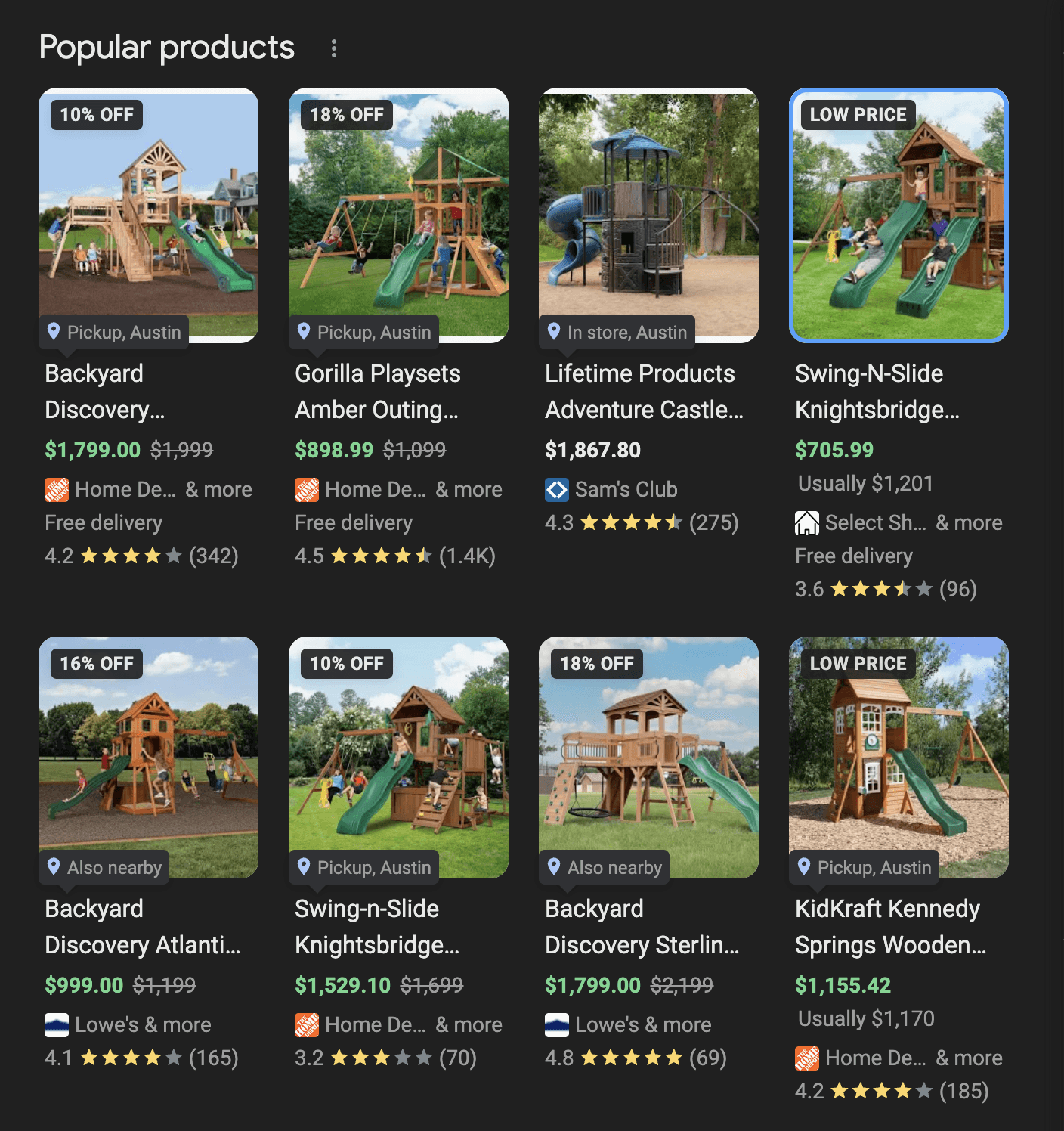
The more precise path tells Google this is a "backyard wooden playset" — not just "playset." That means your product shows up when people search specifically for an outdoor wooden playset, rather than competing against every playset product imaginable.
Google's product taxonomy has thousands of categories. Take the time to find the most specific one that fits. If you're unsure, search Google Shopping for a similar product from a competitor and see what category it's in — Google often shows this in the product details.
Pricing Affects More Than Just Your Margins
Here's something a lot of small business owners don't realize: your pricing directly influences how often Google shows your products. Google Shopping is competitive by design — shoppers can compare products side by side — and Google knows this. If your price is dramatically higher than similar listings, you'll see fewer impressions.
That doesn't mean you need to be the cheapest. But it does mean that competitive pricing can act as an entry point to get more people to your store. Once they're on your site, your product quality, customer service, and brand trust can close the sale.
Pricing rules to follow:
Keep prices in sync: The price in your feed must always match your website. Google checks this regularly.
Reflect taxes and shipping accurately: If you offer free shipping, make sure that's reflected. Hidden fees at checkout drive up cart abandonment.
Update sales in real time: Running a promotion? Update your feed immediately. Showing a full price on Google while your site shows a discount is a consistency problem — and it confuses customers.
Use structured discount data: If you're running a sale, use Google's sale price attributes properly so the crossed-out original price shows in your listing. That visual cue can boost clicks significantly.
Mobile Experience: Don't Lose the Sale After the Click
Getting someone to click your Google Shopping listing is only half the battle. If they land on a slow, clunky mobile page, they'll leave — and you've wasted that visibility.
The majority of Google Shopping traffic comes from mobile devices. That means your product pages need to work beautifully on a phone screen, not just a desktop.
Mobile checklist for small businesses:
Fast-loading images: Large, unoptimized images are the biggest culprit for slow mobile pages. Compress your product photos without sacrificing quality.
Frictionless checkout: Every extra step in your checkout process costs you conversions. If you can offer guest checkout or one-click options, do it.
Multiple payment methods: Apple Pay, Google Pay, and PayPal are expected now. The easier it is to pay, the more sales you'll close.
Mobile-friendly forms: If your checkout requires typing long form fields on a phone, you'll lose people. Use autofill-friendly field names and large input boxes.
Easy-to-tap buttons: "Add to Cart" and "Buy Now" buttons need to be large enough to tap without zooming in. Small buttons are a conversion killer on mobile.
Test your own product pages on your phone right now. Pretend you're a first-time customer. How many taps does it take to buy something? If the answer is more than five or six, start simplifying.
Consistency Is the One Thing That Ties It All Together
If there's one word that should stick with you after reading this guide, it's consistency.
Google is constantly checking whether the information in your Merchant Center feed matches what's actually on your website. A mismatch anywhere — price, availability, product name, images — can cause your listings to be paused or your visibility to drop without warning.
But consistency isn't just about avoiding penalties. It's about building trust with shoppers. When someone clicks your Google Shopping listing and lands on a product page that looks and reads exactly as expected, they're more likely to buy. Surprises at checkout — different prices, unexpected shipping costs, "actually out of stock" messages — are trust-destroyers.
Keep these four things in sync at all times:
Your Merchant Center feed data
Your desktop product pages
Your mobile product pages
Your checkout and pricing (including taxes, shipping, and promotions)
The real takeaway
Google Shopping's free listings reward accuracy, specificity, and consistency. You don't need a massive ad budget to compete — you need a well-maintained feed, strong product titles, competitive pricing, and a smooth mobile experience. Fix those, and free traffic will follow.
One more thing worth knowing: Google AI Mode is now placing ads and organic recommendations inside AI conversations — which means the same product data quality that helps your free listings will also determine how you show up in those new AI-powered results.
Ready to Optimize Your Google Shopping Listings?
Start with your product feed — log into Google Merchant Center and check your feed diagnostics. Fix any errors, then work through product titles, categories, and pricing one section at a time. Small improvements compound quickly in Google Shopping. Need help with SEO?
Let’s talk about your next step.
Schedule a free 15-minute consultation with SOURCEsem. Tell us about your business, ask your questions, and get clarity on where to focus next.


