
Two Locations, One City: Why a Second Page Can Tank Your Rankings
Category
Content
Posted on
Updated

Author
Daria Nikolaeva
SEO & AI Search

Table of Contents
Expanding to a new location? Optimizing for one address is simple. It gets tricky fast when both locations sit in the same city.
Here's the mistake I see businesses make over and over — and what to do instead.
The Challenge: Ranking Two Locations in One City
Picture a showroom out on the 620 corridor, northwest side.
Business is good. The site ranks page one for Austin. It pulls searches from Cedar Park, Lakeway, and Leander too. One page is doing the work of five.
Then they open a second showroom up by Wells Branch.
The obvious move is a new page for the new showroom. It's also the wrong one.
Why a Second Page Backfires
Google won't rank two near-identical pages from one site. It picks one. Usually not the new one.
The new page starts at zero. No history, no links, nothing pointing at it.
The original page gets weaker, not stronger. Two candidates for one query split the signal.
So you end up with a new page that doesn't rank, and an old page that ranks worse than it did before you touched anything.
Both showrooms lose.
The Solution: One Page, Two Google Business Profile Locations
Don't build the second page. Add the second location to the page that's already winning.
Both addresses live on the one city page — two maps, two sets of hours, two LocalBusiness schema blocks.
Each location keeps its own Google Business Profile with its own address, phone number, hours, and reviews.
Both listings point to the same location page. This is allowed. More on that below.
Keyword targets stay put. If the page ranks for Cedar Park and Round Rock today, it keeps them. Don't hand those to a page that has to earn them from scratch.
"Won't Two Listings on One URL Cause Problems?"
No. This is the objection I hear most, and it's the easiest one to put to bed.
Google's own guidelines ask you to "provide a phone number that connects to your individual business location, or provide a website that represents your individual business location."
Read that again. It's or. The only URL rule is against links that redirect people somewhere other than the actual business.
A page describing both of your showrooms isn't that. No policy violation. No suspension risk.
The Result
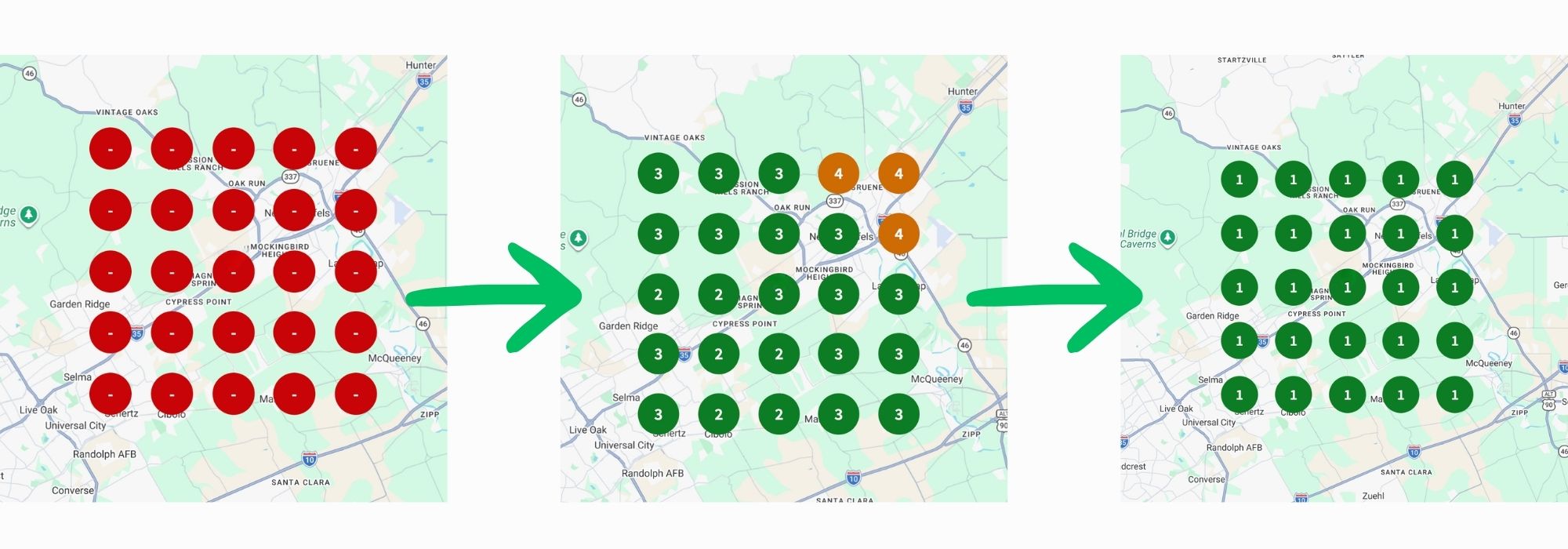
When You Should Build the Second Page
This advice is narrow. Build the separate page when:
The second location is in a genuinely different city. Austin and San Antonio are different markets. So are Austin and Houston. Use your own delivery data, not a map.
The existing page doesn't rank. Nothing to protect, nothing to lose.
The locations sell different things.
Otherwise: consolidate.
One Expectation to Set
Having a physical address in the city someone searches is one of the strongest signals in local search. It's close to a prerequisite.
So if both your showrooms carry Austin addresses, there's a ceiling on how far you'll climb for "Round Rock" searches. You can reach page one. Beating a business physically located in Round Rock is a different fight.
The Takeaway
Opening a second location in the same city is one of the few times the standard local SEO playbook hands you the wrong answer.
A new page doesn't add reach. It splits it — and it puts a page that's already working at risk.
Add the location to the page you have. Keep what you've built. Spend the hours on content about the areas each showroom actually serves, and on the things that move local rankings: your categories, your reviews, and getting your hours and contact details to match everywhere they appear.
Running multiple locations in one city? If you're not sure whether your pages are competing with each other, get in touch — I'll look at how your locations are structured and tell you straight whether it's costing you.
Let’s talk about your next step.
Schedule a free 15-minute consultation with SOURCEsem. Tell us about your business, ask your questions, and get clarity on where to focus next.


